AI can make the work after a coaching session lighter. It can also compromise your client’s confidentiality before you realise what happened. This post covers the four checks any tool has to pass before I let it read a client’s transcript, and the workflow I now use to transcribe, clean, summarise and analyse a coaching session without that trade-off.
I trained as a scientist, did a PhD in molecular physiology, then started my first company. Coaching is my third. So I am not new to building things, and I am not easily sold a story with no evidence behind it. Even so, I underestimated the first part of this.
The first time I pasted a coaching session into ChatGPT, I did not feel hesitation. I felt excited. Here, finally, was something that could distil the insights from a conversation and make the admin lighter. Like most of us, I did not think much further than that.
My version of being careful was much the same as most people’s. I went into the privacy settings, turned off “use my data to train the model”, and trusted that this protected my clients. It took me a while to learn that it does not always hold. The EU rules and the coaching bodies are still catching up, and only now are they making it clearer how far your duty to protect a client’s data extends.
AI tools for voice transcription, meeting note-taking and data processing felt like a godsend, until I began to check how they use and store my data, and for how long. Finding the settings to stop that was a minefield, and I am still not certain I caught all of it. Confidentiality is not a feature of coaching, it is the ground the relationship stands on, and I had been treating it like a checkbox. On top of that, I want to protect what privacy I still can in this digitalised world.
AI is a capability we have not had before, and I stay amazed at what it opens up. At the same time, my excitement has matured into a proper question: how do I protect my privacy and my clients’ confidentiality when using AI tools in coaching?
The things I set out to make better
Looking back, the concern about where AI stores my coaching data made me curious more than cautious. There were a handful of things I wanted to do better, and working through them one at a time is the story of how I arrived at the workflow I use now, CoachFlow included.
Is an AI meeting note-taker safe for coaching?
The first thing was getting private transcription for coaching sessions. I went looking for an accurate, multilingual, AI audio-to-text transcriber that runs locally, on my own laptop or phone. I found one I have been happy with, Superwhisper. There are other local-first and cloud options with privacy controls worth knowing. I have written those up separately, in my post on private audio-to-text options.
The next thing was the tool that reads the coaching transcript, summarises it, and helps me distil the “session gold”. From the research I have done so far, it seems that most AI tools are not built for confidential professional work. That is not a moral failing, it means the defaults are not designed with us coaches in mind. Once the session is text, four things decide whether I will let a tool read it.
Have you removed the identifying details?
There is one thing to do with a coaching transcript before uploading it to any tool: remove the identifying details. I replace details such as names of people, organisations and locations with placeholder text, such as [CLIENT], [COMPANY] and [LOCATION]. So the identifying details are gone before any AI tool sees the text. No client name, no employer, no detail that points to one person.
Record only when you have consent, and work with transcripts your client has agreed you can use. In my coaching client agreement, I disclose that I have permission to use the session records for professional development, and that I may share anonymised results or topics for training or marketing. Naming the tools I use to record, process or analyse the session also adds transparency.
How to remove names from a transcript
Is the transcript kept after the work is done?
I look at what happens to my uploads and chat history once the work is done. A tool that holds your chat history and uploads is building a library of confidential conversations, whether it means to or not. The answer I want is that the material is processed, not kept.
Does the AI train on or keep your data?
Opting out of ChatGPT, Claude or another model using your chats to improve itself is one thing. What the provider retains is another.
To summarise my research on this: opting out moves you from “your data trains future models and is kept for years” to “your data is kept for about 30 days for abuse checks, plus indefinite safety and legal copies you cannot see.” It reduces exposure. It does not give you a clean slate.
There are only two configurations that come close to a clean slate:
a. Zero Data Retention API tiers, where inputs and outputs are not logged, and b. Local or self-hosted models, where your text stays on your machine.
Neither is available on the standard consumer chat products, and many of them do the opposite by default. I only came across Zero Data Retention while building CoachFlow. I am glad I did, because it meant I could run CoachFlow under a ZDR agreement, so the AI provider behind it does not keep your text or train on it.
Where does the tool run, and which law applies?
Hosting decides which rules protect you and your client. For anyone working with people in Europe, EU hosting and GDPR are essential. If a tool cannot tell me where my data goes, I treat the silence as the answer.
To sum up, I am happy to use most AI models and tools for general work, like researching a topic. For analysing and summarising a real client session, I want all four to be true.
The workflow for using AI for coaching safely
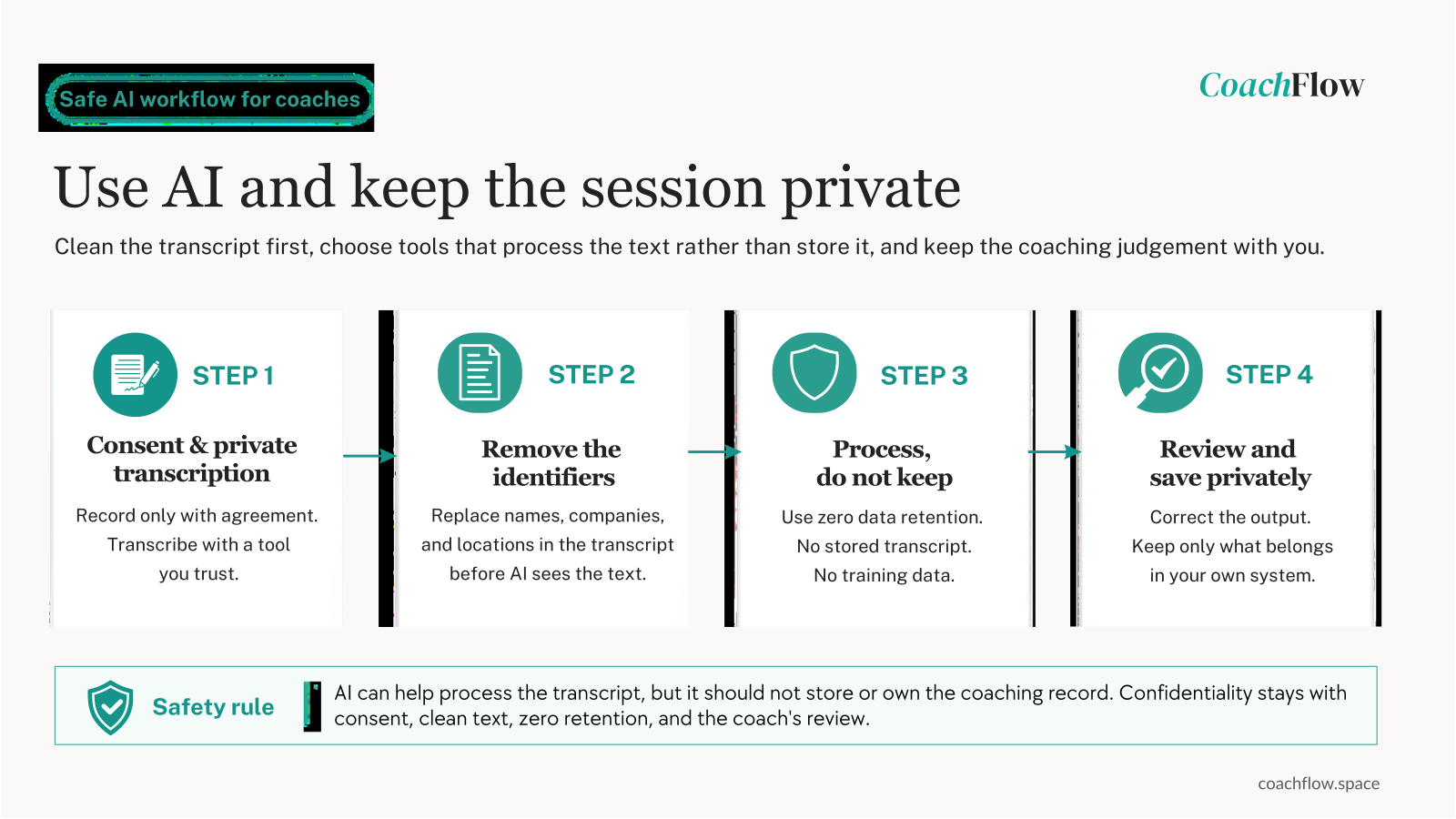
Use AI tools that are local or privacy-first. Record with consent and transcribe. Remove the identifying details. Run the cleaned transcript through a tool that passes your privacy checks. Read the output, correct anything the model misread, and save the notes in your own system. Delete the working transcript once you have what you need, unless you have agreed a reason to keep it.
Done this way, the tool does the first pass on the writing, and the judgement and the confidentiality stay where they belong: with you.
Why I built CoachFlow
CoachFlow started from me wanting something that did not exist. I was getting tired of prompting AI models, and of the limitations of many AI-based tools.
I wanted a safe tool that would help me improve my coaching performance, generate a structured session summary, and sift the “golden nuggets” for content creation.
It was quite a learning journey: first to build the workflows I wanted for my own practice, then to build the code that runs it, safely.
You paste in a transcript with the identifying details removed, and CoachFlow returns four things from that one source: a client-ready summary you review before sending, an ICF-aligned developmental read of the session, the value inside the conversation gathered for reflection, and raw material for content drawn from what was actually said.
On those four checks: you remove the identifying details, and CoachFlow is EU-hosted, GDPR-aligned, runs zero data retention on the model that reads your transcript, and stores no transcript. It works after the session, not during it. There is no bot in the room, and no prompts arrive while you coach. The developmental read is not an official ICF assessment, but feedback to reflect on, to support your growth between mentor coaching sessions.
The point was not the tool. The point is that you can take some repeatable work off your plate without asking your client to trust a system you would not trust yourself.
Try CoachFlow with a 7-day free trial at coachflow.space. You are not charged when you sign up, and you can cancel during the trial at no cost.
One last question, because your answer points to the output worth starting with. What part of the work after the session takes the most out of you? That is the part worth handing over first.