When you hand a tool your coaching work, you deserve to know what happens to it. CoachFlow reads your coaching session transcript, with the identifying details removed, and gives you four sets of outputs. Here is what runs between the upload and the result, so you can see what you are trusting with it.
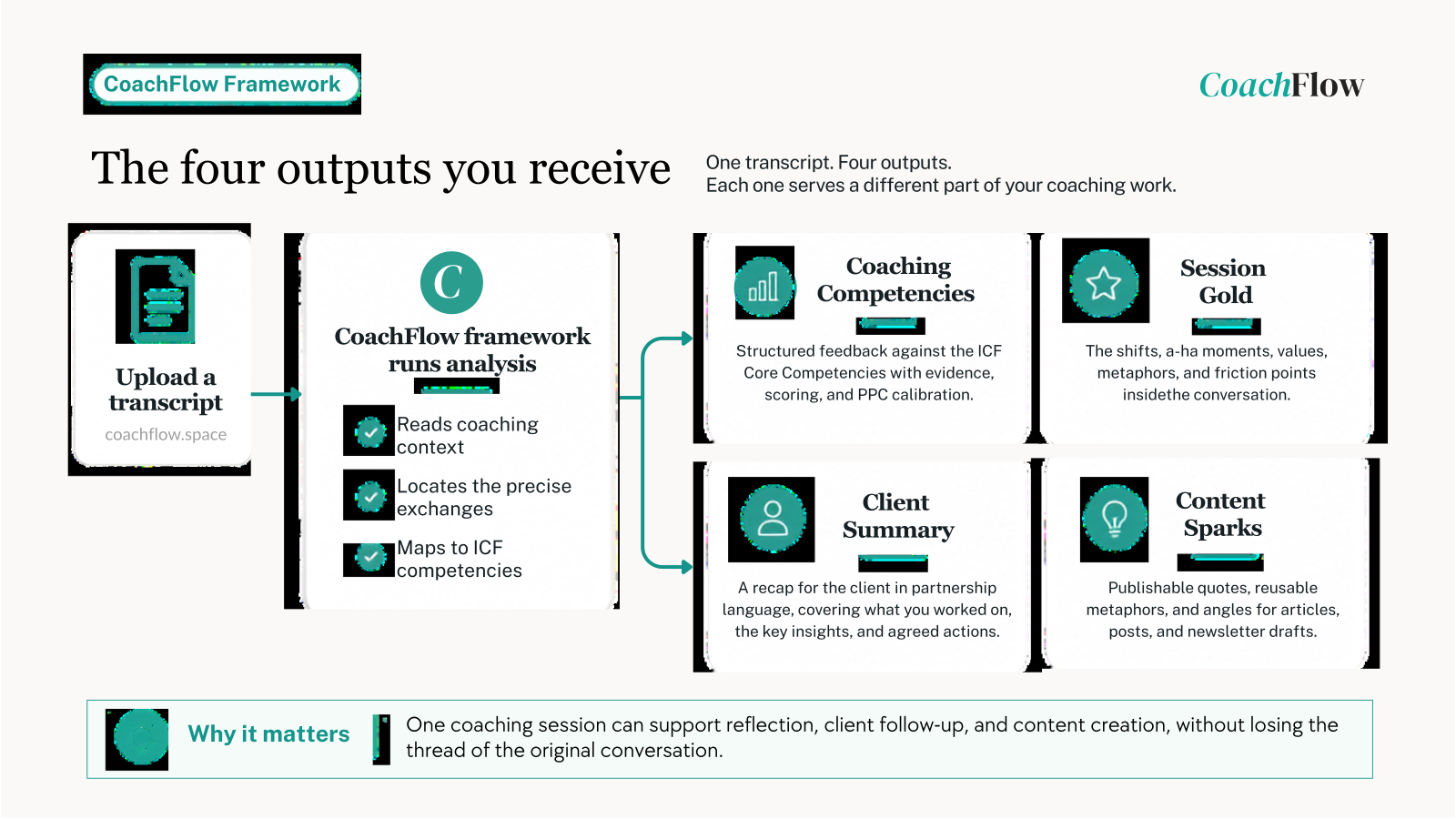
Table of contents
Open Table of contents
The four things you get back
CoachFlow shows its outputs under four tabs.
Coaching Competencies
A structured read of the session transcript against the ICF Core Competencies. It maps your strengths to specific competencies, points to opportunities for growth, scores the eight competencies on a 1 to 10 scale, and calibrates each against the PCC standard, below, at or above. It ends with three development suggestions, and each observation points to a short, attributed quote from your transcript, so you can see what it is responding to. You can download it as a formatted PDF. It is developmental feedback, not an official ICF assessment.
Session Gold
The value inside the conversation: the shifts in your client’s thinking, their most telling words, the a-ha moments, the points where you reframed or guided, the values underneath their decisions, and the friction points you worked on.
Client Summary
A recap written for the client in partnership language, covering what you worked on, the key insights, the realisations that mattered, and the agreed actions. You read it, edit anything that needs changing, and send it yourself.
Content Sparks
Raw material for your writing: publishable quotes, reusable metaphors, and article angles built from the session’s own themes. From any angle, CoachFlow can write a full long-form draft with a LinkedIn post and a newsletter intro, which you edit in place.
Evidence to reflect on
A read of your coaching is most useful when you can see where it comes from. A few choices keep the feedback tied to the transcript.
- Each observation points to a short, attributed quote, so you can see what each point is based on.
- Scores are whole numbers, calibrated against the PCC standard, and the read is built to resist inflating them or softening them to be kind.
- It stays with what the transcript shows, rather than padding with generic praise or reading in things that are not there.
- If a transcript is incomplete, too short, or not a coaching session, it says so and scores conservatively.
- The structure stays consistent, so you can look at the same competencies across different sessions.
So the Coaching Competencies output gives you supportive evidence to reflect on, grounded in your own session, rather than an official ICF assessment. It points you toward what to look at next, and the judgement stays yours.
How it protects your client and your IP
CoachFlow is built around a short list of rules.
- You upload a transcript with the identifying details removed. Here is how to remove names from a transcript.
- The transcript is processed in memory and cleared once the analysis has run, so no copy of it is kept.
- The results are not saved on CoachFlow’s side either. You copy or download each output to a destination you choose, and when you leave, they are gone.
- The model runs under a zero-data-retention agreement, so your text is not kept and is not used to train future models.
- As a second layer, CoachFlow runs its own privacy sanitisation, generalising any names, roles or locations that remain, so identifying detail does not surface in the outputs even if something slipped past your clean-up.
- Hosting is in the EU, and the design follows GDPR.
Because the work is not stored or used to train anything, your session material and the outputs you build from it stay yours.
And a boundary worth stating: CoachFlow works after the session, not during it. It is not a meeting bot, a recorder or a transcription tool. It starts on the text you have already chosen to use. The transcription step is yours, and you can read about private audio-to-text options separately.
What it is, and what it is not
CoachFlow is not a transcript summariser, a generic AI wrapper, or a coaching-theory explainer. It is two reads working together: a standards read against the ICF competencies, and an insight read that pulls the value and the content out of the same session. One transcript, four outputs, a fixed structure, and a privacy-first design around all of it.
I built it as a practising coach, for the part of the work I wanted handled with care.
CoachFlow Plans
CoachFlow has three plans: Starter, Pro and Business. One analysis, which gives you all four outputs (Coaching Competencies, Session Gold, Client Summary and Content Sparks), counts as one credit, no matter how much work it does behind the scenes. Many AI tools bill by tokens, which makes it hard to know in advance how much you need or how much you are using. A credit is simpler: one analysis, one credit. As long as your subscription stays active, your credits are refilled every 30 days.
Each plan starts with a 7-day free trial. You subscribe with a card but are not charged during the trial, and you can cancel any time in those seven days at no cost. If you stay, the first charge comes when the trial ends, and two days before that you get a reminder, so it does not catch you off guard. You can see what each plan includes on the pricing page.
If you want to see what CoachFlow makes of one of your own session transcripts, start a 7-day free trial at coachflow.space. You are not charged when you sign up, and you can cancel during the trial at no cost.